How to Send Large Files Free : Methods Ranked by File Size
Hitting a “file size limit” error right before a deadline is incredibly frustrating. Traditional email
and workplace chat apps usually cap attachments at a meager 25MB. This restriction leaves office workers and remote employees stranded. It completely ignores the reality of modern digital projects. For example, your goal might simply be to send large files free 10gb or larger to a client.
When you hit that size wall, your entire workflow stalls.
Fortunately, you do not need a paid corporate subscription to beat these limits. Many excellent web tools let you transfer multi-gigabyte files safely and quickly. Best of all, they do not cost a single dime. To help you find the right tool for your project, this guide ranks the best free file- sharing platforms. We have organized them simply, starting from the smallest free tier up to the largest.
The Hidden Cost of Free File Transfer Services
Free file-sharing platforms are highly convenient, but they are still businesses. Running these websites costs money. To make a profit and push you toward a paid plan, platforms often add hidden limits. Knowing these rules can save you from major project headaches later.
Expiration Timers
Most free tiers use links that permanently expire after 2 to 7 days. If your recipient is slow to check their email, the link becomes useless. You will have to upload the whole file all over again.
Speed Throttling
Many services limit your download speeds on purpose. A large video file that should take minutes can easily turn into an all-day bottleneck for your recipient.
Aggressive Data Compression
Some tools automatically shrink your files using background ZIP files. They might even down-sample your data. This can ruin your work by changing high-resolution images or videos into lower-quality files.
Free Transfer Methods Under 5GB: The Entry-Tier Options
If you only need to send small document packages, quick spreadsheets, or low-resolution images, your everyday apps work perfectly. However, these entry-tier options fall short when you try to share massive media archives.H3. 1. Standard Email Platforms (Caps at 25MB)
Gmail and Outlook are the ultimate office defaults, but they handle attachments with strict limits.
If your file exceeds 25MB, these platforms automatically shunt your attachment into cloud storage alternatives like Google Drive or OneDrive.
Instead of a direct file, your recipient receives a cloud link. Over time, this habit quickly eats into your personal, free storage quotas. Once that cloud storage fills up, you cannot even receive regular emails until you pay to upgrade your space.
2. Messaging and Collaboration Apps (Caps at 100MB – 2GB)
Workplace tools like Slack, WhatsApp, and Discord offer slightly more breathing room, but they still have tight boundaries. For instance, Discord caps free individual attachments at a tiny 10MB, while WhatsApp limits them to 2GB.
Meanwhile, the free tier of Slack enforces a 90-day team history limit rather than just a file cap, meaning your shared files will eventually disappear behind a history paywall. Ultimately, these communication platforms are built for quick chats and casual updates, not for robust data distribution.
How to Send Large Files Free (10GB Limit Solution)
Stepping past basic messaging limits requires specialized transfer services built for heavy lifting.
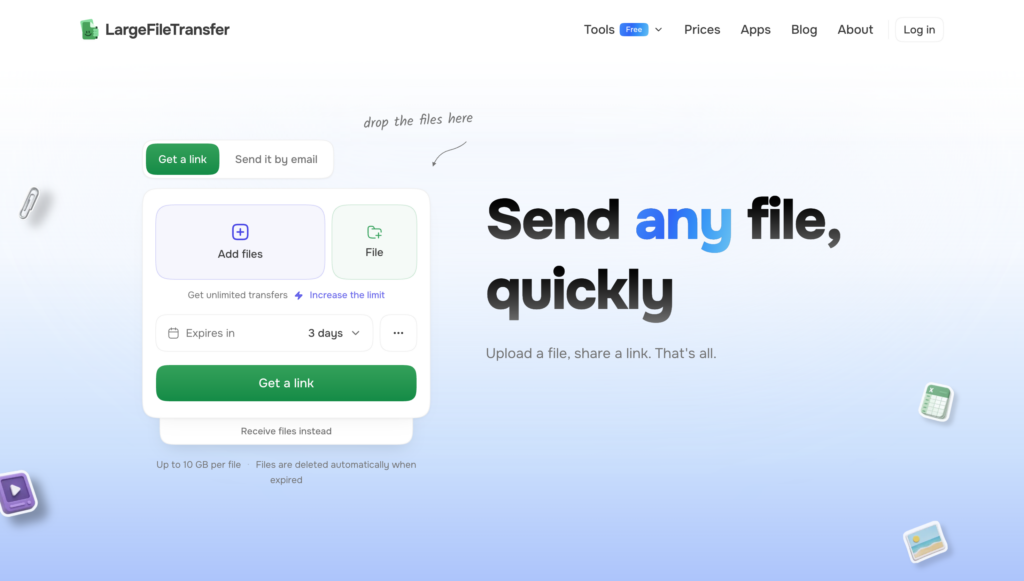
Our platform, LargeFileTransfer, bridges this exact gap perfectly. We engineered this tool specifically to eliminate the annoying restrictions and subscription pop-ups that ruin other free web utilities. Instead of trapping your workflows behind premium paywalls, our free tier prioritizes, pure speed and seamless usability.
Finding a reliable way to send large files free 10gb or larger used to mean dealing with constant digital bottlenecks. LargeFileTransfer changes that by giving you the exact tools needed to move big projects without any hassle.
10GB Uncapped Allocation
Move heavy multimedia projects, massive software builds, or high-density PDF catalogs easily. Each transfer link handles up to 10GB completely free.
No Sign-Up Friction
Generate secure web delivery links instantly. Senders and recipients never have to create username profiles, type passwords, or sign up for marketing emails.
High-Speed Pipeline Delivery
Enjoy maximum network bandwidth on a completely free plan. We never use artificial speed limits to slow down your transfers, bypassing a common trick used by traditional competitors. Removing these classic digital hurdles makes sharing large files as simple as a quick copy-and- paste action. Your office data, videos, or design packages will reach their destination safely and quickly every single time.
Don’t let a 25MB limit stall your workday
Ready to bypass restrictive size limits? Send your files via secure link without any installations.
Try LargeFileTransfer to Send 10GB Files for Free Today
How to Send Large Files 50GB Free
When project sizes outgrow a 10GB limit, you must step into the mid-tier cloud landscape. Orchestrating a heavy 50GB dataset migration requires specialized free web tools or decentralized cloud lockers.
Finding a secure way to send large files 50gb free of charge helps you transfer massive 4K video directories or full software builds without a credit card. However, this massive scale comes with strict platform rules.
Unlike lower-tier options, these massive 50GB allowances often implement severe restrictions to prevent free-tier storage abuse. Many providers force you to complete a mandatory user registration process before letting you upload. More importantly, these services usually impose aggressive link expiration dates. Some links self-destruct in as little as 48 hours. If your recipient is slow to check their inbox, your data disappears. This forces you to restart the long upload pipeline all over again.
Before choosing an intermediate platform, it helps to see how different providers balance their limits. To weigh your options, read our Honest File Transfer Comparison (#6 Comparison). This breakdown reveals how the top market competitors stack up regarding real speed, storage caps, and registration requirements.
Enterprise Scale Pipelines: Send 100gb File Free
Moving a massive 100GB master file across the internet can easily freeze a standard computer setup. Independent videographers, data managers, and power-users encounter this frustrating wall when sharing high-resolution video projects or raw data archives. Paying for a steep corporate subscription is not your only choice. Learning how to send 100gb file free of charge simply requires using alternative sharing methods.
1. Peer-to-Peer (P2P) Web Utilities
Some free web applications connect your computer directly to your recipient’s device. Because these tools bypass central cloud storage servers entirely, they completely eliminate file size restrictions. However, there is a clear catch.
Both devices must stay powered on and connected tothe internet at the same time. Closing either browser window instantly stops the entire transfer progress.
2. Multi-Part Archiving Workflows
Free zip tools like 7-Zip let you chop your massive project folders into smaller pieces. You simply right-click your folder, select the archive tool, and split the volume. This technique lets you safely slice a single 100GB package into ten separate 10GB blocks. From there, you can easily route them through basic free transfer platforms.
Sometimes your recipient only needs to look at one small part of a massive package. Routing chunks through email or team chat apps saves a lot of time. To master these basic communication tools, check out our guide on 7 Methods to Send Large Files via Email (#7 Email Methods).
This resource shows you how to bypass strict inbox limits without triggering errors.
Frequently Asked Questions
How can I transfer 50GB of files to someone online for free?
To transfer 50GB of files online for free, use a specialized web service that supports high-capacity free tiers or peer-to-peer browser sharing. Alternatively, compress your folder into smaller, multi- part ZIP volumes using a free tool like 7-Zip, then upload those individual blocks through a standard 10GB file-sharing link.
How to send a 10GB file over the Internet?
The easiest way to send a 10GB file over the internet is to upload it to LargeFileTransfer. The platform’s free tier natively supports file packages up to 10GB without requiring account registration. Simply drop your file on the page, generate a secure download link, and share it with your recipient.
Which file sharing service allows you to share 100GB files?
True 100GB file sharing is typically handled by decentralized peer-to-peer (P2P) web tools or high-tier cloud storage services. For a zero-cost option, direct browser-to-browser web utilities allow you to share 100GB folders for free because the data streams directly between devices without consuming external cloud server space.
Choose the Right Free File Sharing Limit for Your Workflow
You do not need a premium subscription or a massive corporate budget to move large datasets across the internet. Managing your project efficiently simply depends on knowing your data’s exact gigabyte footprint. Identifying that size allows you to select the ideal free tool for the job.
You can easily use a fast, no-signup 10GB link service LargeFileTransfer for quick office tasks, or break down a 100GB folder using advanced archiving tricks.
Ultimately, matching your workflow to the right free platform keeps your digital delivery fast, secure, and completely seamless.